🔧 Duino Coin Mining on ESP01
Today I continue testing the performance of Duino Coin on different hardware ⚙️
In this video, I’ll show how to install and run the Duino Coin miner on an ESP8266 board (ESP-01 version).
🎥 Video Tutorial
📦 Downloading the Miner
I downloaded the miner release from the official GitHub repo.
Inside the miner folder, you'll find the 📁 ESP8266_Code directory.
🛠️ Setting Up in Arduino IDE
- Open
ESP8266_Code.inousing the Arduino IDE 🧰 - Change the following values:
- 🔐
SSID→ your WiFi name - 🔑
Password→ your WiFi password - 👤
DUCO username→ your Duino Coin wallet name - 💻
Rig name→ optional, but helps to identify your miner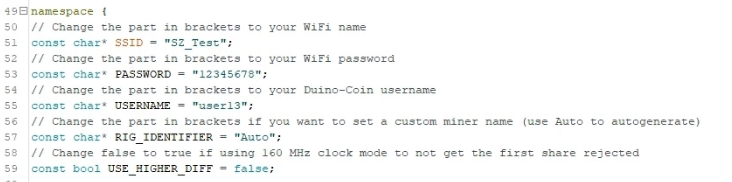
- Go to Tools > Board and select:
✅Generic ESP8266 Module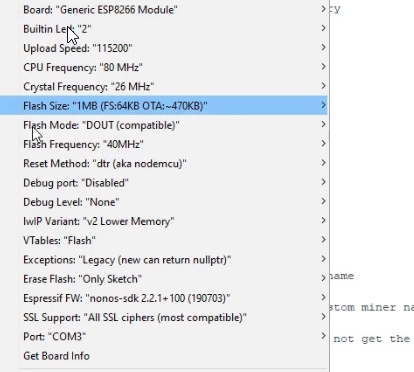
- Select the COM port where the ESP is connected 🔌
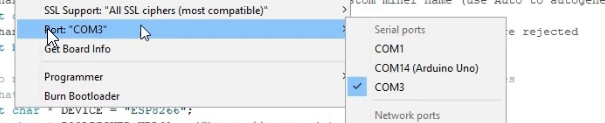
- Click Upload ⬆️
🖥️ Monitor & Results
- Set Serial Monitor baud rate to 500000 ⚡
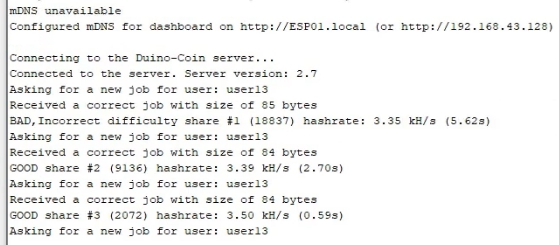
- You’ll see debug output with connection status and hashrate info.
📊 Benchmark Results
- ⛏️ Average hashrate:
3.5 kH/s
- ⚡ Power consumption: ~
5 mA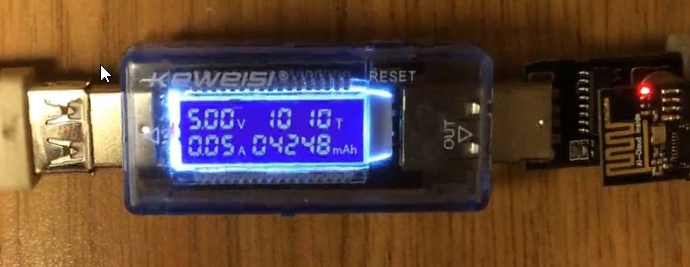
That's it! 🎉 You've got a tiny but power-efficient Duino miner running on an ESP01. Perfect for testing or low-power experimentation!