This guide explains how to mine Duino Coin using a Raspberry Pi 3 running Raspberry Pi OS Lite.
🎥 Video Tutorial
🧰 Preparation
- 📥 Download OS
Download the Raspberry Pi OS 64-bit Lite version from the official website.
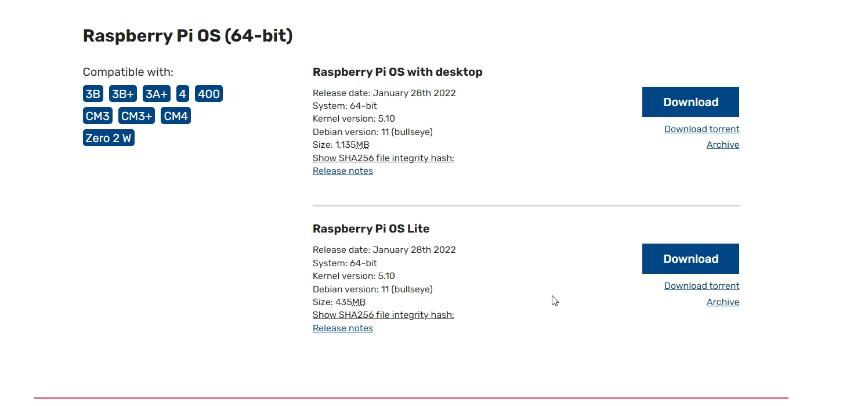
- 💾 Flash to SD Card
Use Balena Etcher to write the image to your SD card.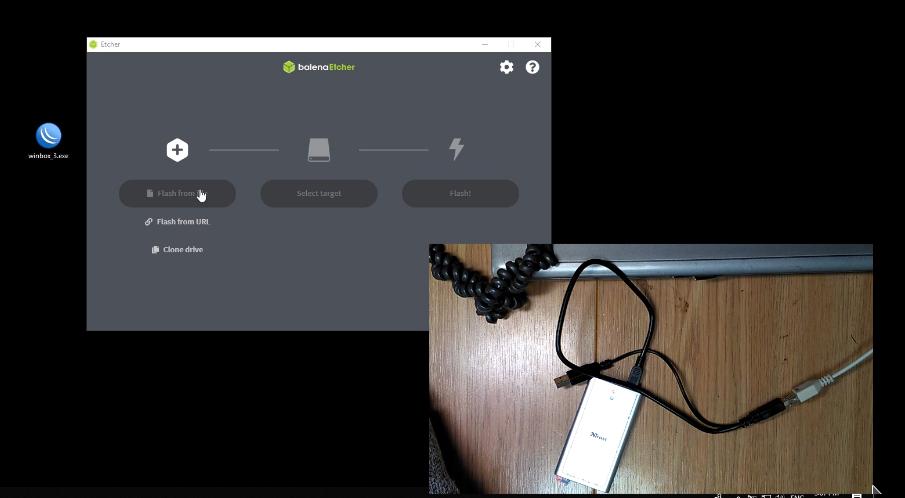
- 🚀 First Boot & Login
Insert the SD card into your Raspberry Pi and power it on.
Default login credentials (may vary by OS version): - 👤 Username:
pi -
🔒 Password:
raspberry
-
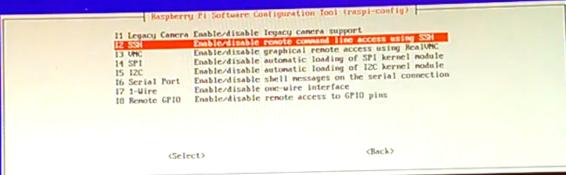
📡 Enable SSH
Open the configuration menu:
sudo raspi-config
 Navigate to Interface Options ➝ SSH ➝ Enable ✅
- 🔌 Connect via SSH
Use PuTTY or another SSH client to connect to the Pi from your PC.
🔄 Update the System
sudo apt update
sudo apt upgrade


📦 Install Required Packages
sudo apt install python python3-pip git

🧬 Clone and Run Duino Coin Miner
- 🔗 Clone the repository
git clone https://github.com/revoxhere/duino-coin.git
 2. 📂 Enter the project folder
cd duino-coin
 3. 🏃 Run the miner
python3 PC_Miner.py
 4. 🛠️ Fill in miner details
- 🧑💻 Duino-Coin username
- 🔧 Intensity
- 🧵 Threads
- 🎯 Difficulty
- 💻 Rig name
- 💸 Donation level
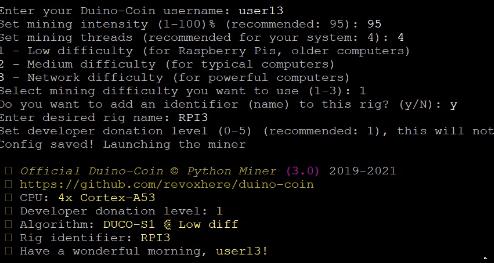
⚙️ Result
Your miner will now start! 🎉 Typical mining speed on a Raspberry Pi 3 (without FastHash) is approximately:
🚀 409 kH/s

Happy mining! 💰