⚙️ Duino Coin FastHash on Raspberry Pi 3 🍓
Today I compiled and tested the FastHash library for Duino Coin on a Raspberry Pi 3.
Below are the setup and compilation steps 🧩👇
🎥 Video Tutorial
🧰 Step-by-Step Installation & Build
- 🦀 Install Rust compiler:
curl --proto '=https' --tlsv1.2 -sSf https://sh.rustup.rs/ | sh
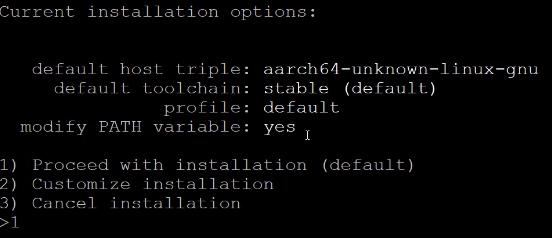
 2. 🔢 Choose option 1 to proceed with installation.
 3. 📁 Enter the Rust environment:
source $HOME/.cargo/env
 4. 📥 Download FastHash source code:
wget https://server.duinocoin.com/fasthash/libducohash.tar.gz
 5. 🗜️ Extract (untar) the source archive:
tar -xvf libducohash.tar.gz
 6. 📂 Go into the source folder:
cd libducohash
 7. 🏗️ Build the library:
cargo build --release
 8. 📁 Enter the release folder:
cd target/release/
 9. 📄 Copy the compiled file to the Duino Coin miner directory:
cp libducohasher.so ~/duino-coin/
 10. 💽 Enter the miner directory:
cd ~/duino-coin/
 11. ▶️ Run the miner:
python3 PC_Miner.py

⚡ Performance Result
🚀 Average mining speed with FastHash on Raspberry Pi 3:
3.71 MH/s ⚡🔥
